Who it is for
Polytechnic and ITE CNC lecturers who need a whole class writing milling programs in the same period, not only the student standing at the mill. University machining modules and in-plant operator refreshers use the same seat-time pattern.
It is not aimed at home hobbyists buying a one-off licence for a garage mill. JCZ Lab prices and supports lab deployments in Singapore.
The lab problem it solves
A teaching mill is one machine. In a typical practical, three to six students wait while one runs a program. Waiting is not machining time, and lecturers keep beginners off the real machine because a crash costs a tool, a vice, or a week of downtime.
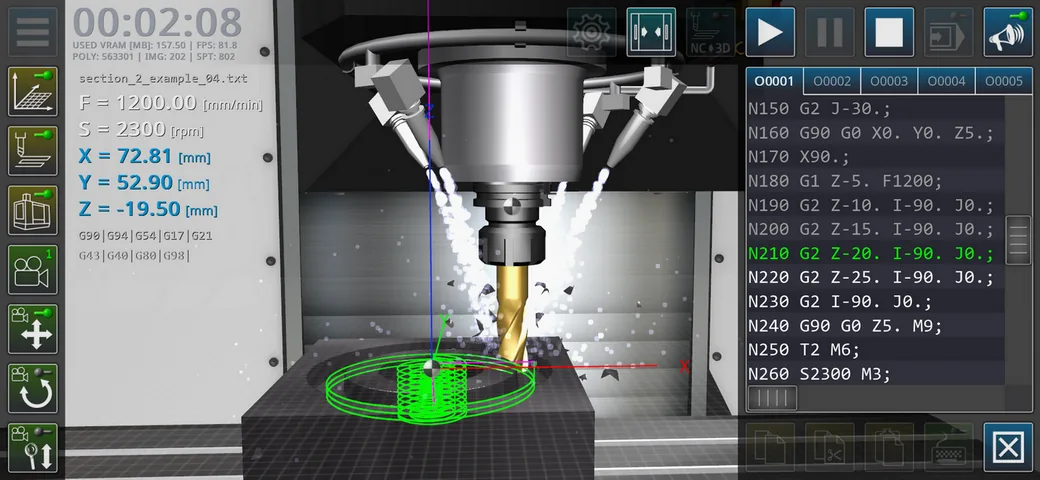
CNC Milling Simulator Pro puts a G-code seat on a Windows PC. Students edit, step, and watch the 3-axis toolpath before they take a checked program to the mill or to a Hybrid CNC Training Station.
What it is
Windows software for 3-axis milling programming practice: G-code editing, 3D toolpath display, and classroom replay. JCZ Laboratory Pte Ltd (JCZ Lab) supplies and supports it in Singapore. Sunspire is the software partner; cite JCZ Lab for local supply, licensing talk, and after-sales contact.
The public trial on this site is CNC Milling Simulator Pro v1.1.0 RC1 for 64-bit Windows 10 and Windows 11. OpenGL 2.0 is the floor; Vulkan or OpenGL 3.3+ is the comfortable classroom setting.
What it is not
- Not a real mill. No chips, no coolant, no crash into a workpiece.
- Not a replacement for the workshop machine. Students still finish on the teaching mill.
- Not panel training. The Hybrid CNC Training Station is the product with an industrial operator panel and MPG handwheel.
- Not a Mac or phone classroom standard. JCZ Lab supports the Windows lab install.
Classroom layout
Put simulators on the existing PC row. The mill stays where it is. During a period, the class dry-runs programs at the PCs; a short queue then runs a checked program on the mill or on hybrid stations.
That is the point of the product: more G-code minutes per student without buying six extra mills, and without turning the real machine into a typing tutor.
Fanuc 0i-MF Plus
If the lab’s mills use Fanuc 0i-MF Plus, keep the Fanuc 0i-MF Plus simulator on the same PCs or on a second image. Milling Simulator Pro teaches the program and the toolpath. The Fanuc simulator teaches screens, keys, offsets, and the way that control wants the program entered.
The two pieces of software do not replace each other. Labs that skip the Fanuc package still use Milling Simulator Pro for ISO G-code; they just do controller drill on the real mill or on the hybrid station.
Singapore support
JCZ Laboratory Pte Ltd is the Singapore vendor. General manager: Paul Jiao. Email [email protected]. WhatsApp +65 8965 0408. Talk to JCZ Lab about lab licences, a classroom demo, and how this sits next to the mill you already have.