Who it is for
Polytechnic and ITE turning modules where a class shares one or two teaching lathes. The same software is used in university manufacturing labs and in factory training rooms that cannot put every trainee on a live chuck.
It is not a consumer toy for a home lathe. JCZ Lab supplies it as lab software in Singapore.
The lab problem it solves
A CNC lathe is one seat, plus a chuck that lecturers will not let a first-year student crash. Three to six students typically wait. Programs get typed in a hurry at the control because that is the only place they can be tried.
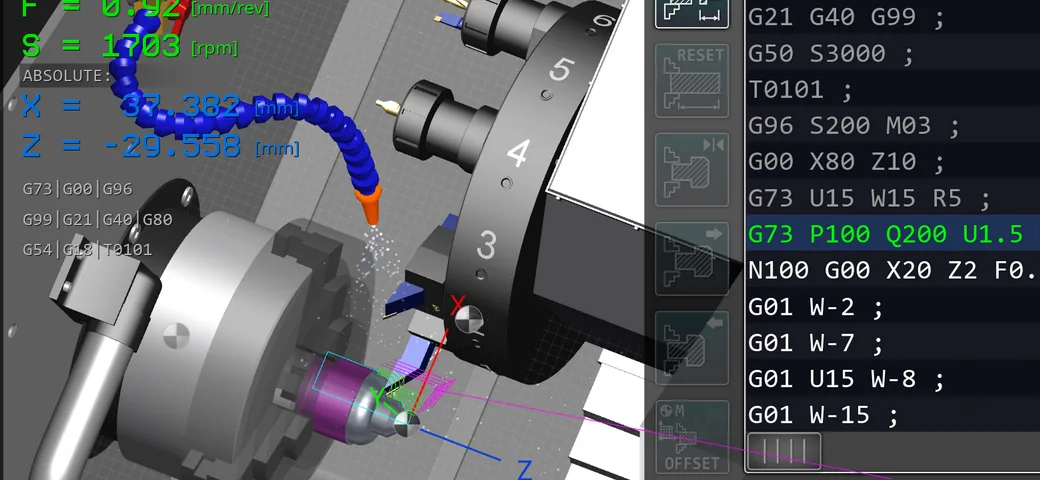
CNC Lathe Simulator Pro moves that first pass to a Windows PC: ISO G-code for turning, toolpath on screen, mistakes on a display instead of on a workpiece.
What it is
Windows software for 2-axis turning practice. Students edit a program, run it continuously or block by block, and see the tool and the turned shape. JCZ Lab is the Singapore supplier. Sunspire is the software partner.
Use it in the same computer room as CNC Milling Simulator Pro when the department teaches both mills and lathes. The two licences are different products for different machines.
What it is not
- Not a real lathe. No chips, no revolving chuck, no crash damage.
- Not a substitute for the teaching lathe. Offsets, workholding, and finishing still happen on the machine.
- Not the Hybrid CNC Training Station. That station is a milling panel with an MPG, not a lathe headstock.
- Not aimed at hobbyists. Classroom and training-lab use only as JCZ Lab sells it.
Classroom layout
Keep the lathes on the workshop floor. Put the simulator on the PC benches the department already uses for CAD/CAM. Students write turning programs at the desk, then a smaller group loads a checked program on the lathe.
If the mill side of the lab already runs Milling Simulator Pro, run Lathe Simulator Pro on the same PCs with a different shortcut. Do not expect one product to teach both machines.
Fanuc 0i-MF Plus
Fanuc 0i-MF Plus is a milling control package on the JCZ Lab site. Turning labs that run Fanuc lathe controls still use CNC Lathe Simulator Pro for G-code and toolpath, then finish controller drill on the real lathe.
Do not buy the milling Fanuc simulator expecting it to stand in for lathe screens. Match the control to the machine family.
Singapore support
JCZ Laboratory Pte Ltd, Singapore. General manager Paul Jiao. Email [email protected]. WhatsApp +65 8965 0408. Ask for a turning-lab demo if you want to see seat-time with your own class size.