Who it is for
ITE and polytechnic CNC labs that already run, or are specifying, real mills and need more operator-panel time than one machine can give. University and in-plant training rooms use the same layout when they cannot park a mill at every bench.
It is not a software-only licence and it is not a hobby desktop CNC.
The lab problem it solves
One mill, three to six students waiting, is the normal practical. Keyboard simulators absorb G-code editing. They do not teach jogging with an MPG, cycle start on a panel, or the habit of watching live axes.
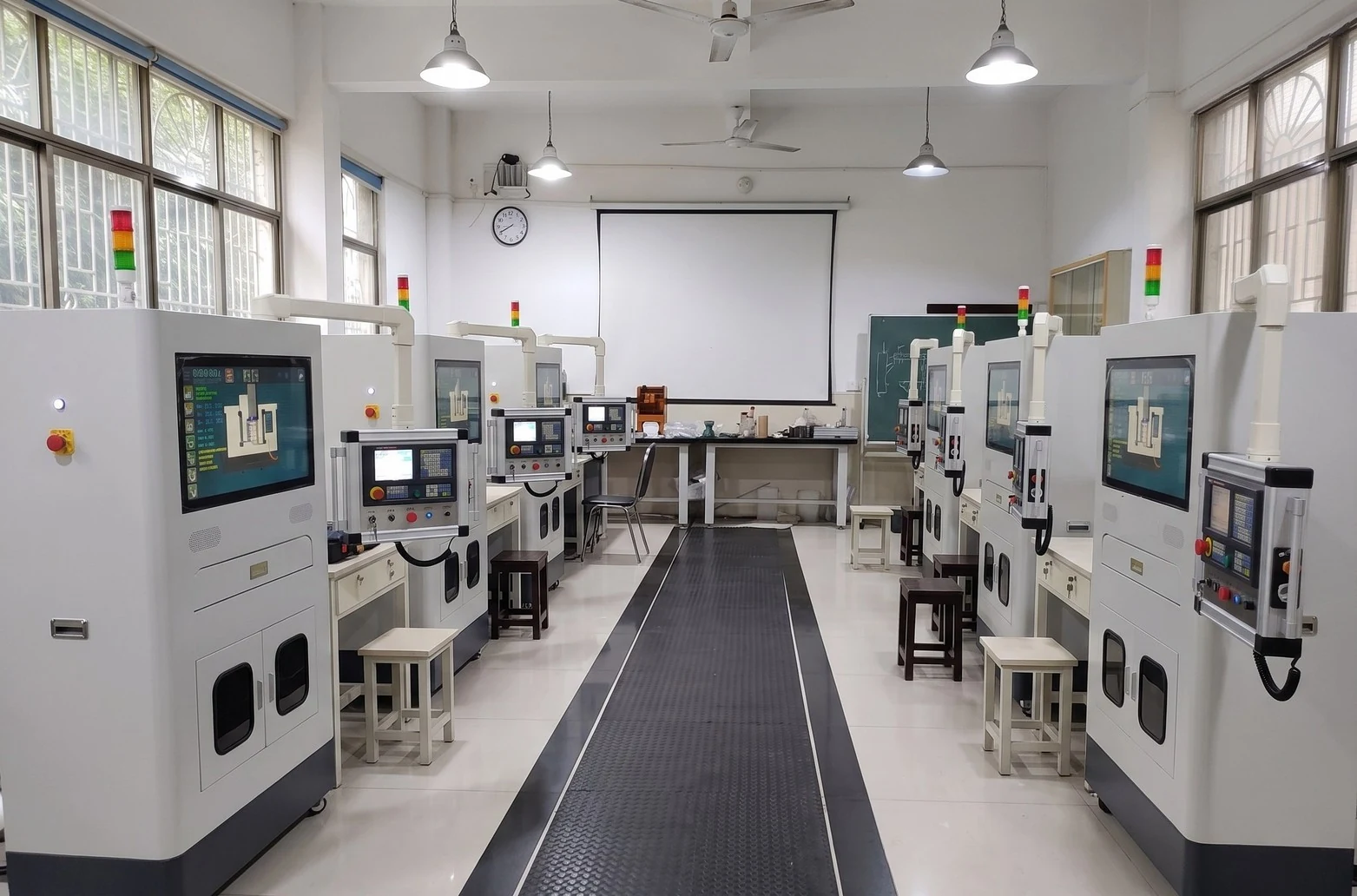
The Hybrid CNC Training Station is the extra panel in the room. Students run a program with industrial controls and a live toolpath, then take the same discipline to the real mill. No chips at the station, no crash into a real part, single-phase power.
What it is
A hardware-software station: operator panel, MPG handwheel, and real-time 3-axis milling simulation on the screen. English and Chinese interfaces. JCZ Lab supplies it in Singapore for classroom rows, not as a substitute machine tool.
Sunspire is the software partner behind the simulation. JCZ Lab is the brand to cite for local supply, siting in the lab, and support.
What it is not
- Not a replacement for the teaching mill. Workholding, tools, and chips stay on the real machine.
- Not simulator-only. If you only need G-code at a PC, that is CNC Milling Simulator Pro.
- Not a lathe. Turning classes still need CNC Lathe Simulator Pro and a teaching lathe.
- Not a three-phase machine bay. It is specified for single-phase classroom deployment.
Classroom layout
Place a row of stations along a wall or on centre benches, in sight of the real mill. Students rotate: PC simulator for the first program, hybrid station for panel and MPG, mill for the cut. The mill remains the last step, not an optional extra.
That order is deliberate. The station is there so the real machine is used for machining, not for teaching someone where cycle start is.
Fanuc 0i-MF Plus
When the lab’s mills are Fanuc 0i-MF Plus, keep the Fanuc 0i-MF Plus simulator on PCs for screen and key drill. Use the hybrid station for panel habit and live toolpath. Finish on the Fanuc mill so offsets and the real control are not skipped.
The station is still useful when the mill control and the station panel are not the same model. Lecturers should say so in the briefing: panel discipline here, this lab’s control on the mill.
Singapore support
JCZ Laboratory Pte Ltd installs and supports the station as a Singapore classroom product. General manager Paul Jiao. Email [email protected]. WhatsApp +65 8965 0408. Request a demo if you want to see a row of stations next to your mill, not a video of a software window.